AI agents are easy to demo and surprisingly easy to make useful. The harder question is what happens after the demo, when the agent starts learning your environment, writing reusable skills, and quietly changing the way future work gets done.
I have been using Hermes Agent as a practical DevOps assistant, not as a toy chatbot. It runs from Telegram (and/or Discord), has access to tools, can inspect files, execute commands, remember preferences, and reuse procedures through skills. That last part matters. A skill is not just a prompt snippet. In day-to-day work it becomes a small operational playbook: how we debug a service, how we review a pull request, how we create a report, how we handle a recurring server task.
That is useful, but it creates a new problem. If skills are the agent’s operating procedures, then skills need version control. They need review. They need rollback. They need the same boring governance we already apply to Terraform, Ansible, CI pipelines, and application code.
This post explains the setup I built around Hermes skills using GitLab, systemd, and a few custom scripts. It is not a generic “install Hermes” tutorial. It is closer to a field note from running an AI agent as part of a DevOps workflow.
Why Hermes instead of OpenClaw?
OpenClaw is a strong project and the comparison is not about declaring a universal winner. My reason for using Hermes is simpler: Hermes fits the way I actually work.
I need an agent that can live in the places where work happens. Some days that is a terminal, some days it is Telegram and other days it is a long running support task, a GitHub review, or a server investigation. Hermes is built around that model: tool access, messaging gateway, cron jobs, persistent memory, profiles, and skills. It is less interesting as a chat UI and more interesting as a small automation layer around an engineer.
The key difference for me is the self-improving loop. When Hermes solves something non-trivial, I can turn the approach into a skill. The next session does not start from zero. The agent can load that skill and follow a proven procedure. That solves the “AI agent amnesia” problem better than keeping a giant prompt full of notes. Memory remembers facts. Skills remember procedures.
The Medium articles that influenced this setup make three useful points: switching tools is not only about features (1), agents without persistent memory repeat mistakes (2), and self-learning agents need a performance review (3). I agree with that last point the most. The moment an agent can mutate its own working knowledge, you need a control plane around that knowledge.
The short version: Hermes gives us memory and skills. GitLab gives us history and review. The custom scripts connect those two worlds.
What we use Hermes for
In a DevOps context, Hermes is useful because it can move between conversation and action. I can ask it to check a service, inspect a config, summarize logs, create a script, review a diff, or schedule a recurring task. It is not replacing engineering judgment, rather it is removing the repeated friction around small operational tasks.
Typical use cases in my workflow look like this:
- Debugging Linux services and systemd units.
- Writing and reviewing small Bash or Python utilities.
- Documenting server procedures so they are not rediscovered every month.
- Creating reusable skills for GitHub, WordPress, marketing research, and infrastructure work.
- Running checks from Telegram when I am away from a full terminal.
The most valuable pattern is not “ask the AI a question.” It is “turn a solved problem into a reusable operational procedure.” That is where skills become infrastructure.
The problem with skills: they are code-adjacent
A Hermes skill is usually Markdown, but operationally it behaves like code. It changes how the agent behaves. A bad skill can make the agent choose the wrong workflow, skip an important check, use stale commands, or repeat a broken assumption.
That is why I do not want skills to live only as loose files on one server. I want to know:
- Which skill changed?
- When did it change?
- What exactly changed?
- Was the change meaningful or just runtime noise?
- Can I roll it back?
- Can I sync it to another machine later?
Those are DevOps questions, so the answer should look familiar to anyone: Git.
The repository layout
Hermes uses a category-based skill layout. A skill lives under a category folder with a SKILL.md file:
/root/.hermes/skills/<category>/<skill-name>/SKILL.mdFor example:
/root/.hermes/skills/devops/webhook-subscriptions/SKILL.md
/root/.hermes/skills/github/github-pr-workflow/SKILL.md
/root/.hermes/skills/software-development/systematic-debugging/SKILL.md
The whole /root/.hermes/skills directory is a Git repository with a GitLab remote:
origin git@gitlab.com:locastic/hermes/hermes-skills.gitNew skills created through Hermes go directly into this active category tree. That means we no longer need a promotion step for normal skill creation. Promotion is only for skills drafted somewhere else, such as a staging folder or an imported external path.
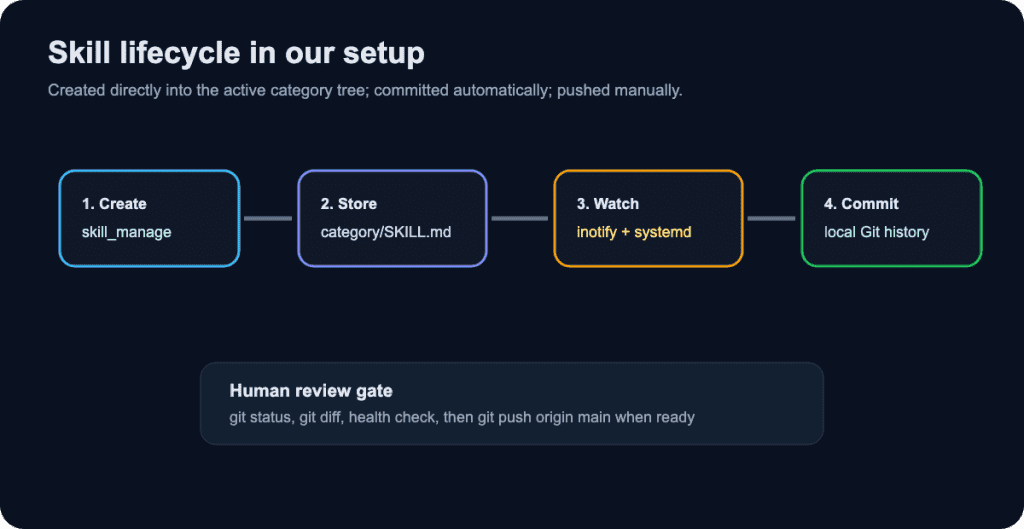
Normal skill creation no longer needs promotion. The GitLab push remains manual by choice/design.
Why we created custom scripts
Hermes gives us the skill mechanism and git gives us history. But we still needed the glue around the edges.
The custom scripts solve four practical problems:
Auto-commit real changes: Skills should be committed when they change, without relying on me to remember every local edit.
Ignore runtime noise: Lock files, cache files, audit logs, and Python bytecode should not become Git commits.
Health check the library: We need a quick way to find malformed, stale, or suspicious skills.
Promote external drafts: When a skill is manually staged, it should be validated and moved into the correct category layout.
You can find our GitHub repository with the scripts here:
https://github.com/Locastic/hermes-skill-git-automation
Script 1: the watcher
The watcher is a Bash script managed by systemd:
/root/.hermes/custom/locastic-skill_watcher.sh
/etc/systemd/system/hermes-skill-watcher.service
It uses inotifywait to monitor /root/.hermes/skills. When a file is written, moved, or deleted, it waits briefly, checks Git status, filters out noisy paths, stages meaningful changes, and creates a local commit.
The important part is the filter. We explicitly ignore files like:
.usage.json.lock
.curator_state.lock
.hub/lock.json
.hub/audit.log
.hub/cache/
__pycache__/
*.pyc
*.tmp
*.swp
Without that filter, the repository becomes useless. You get commits that only say a lock file changed. That is not an audit trail. That is noise pretending to be governance.
The watcher commits locally with a message like:
skill-mutation: 2026-06-18T11:53:44Z

Changed files:
M software-development/example-skill/SKILL.md

Source: hermes-session auto-commit
Watcher: locastic-skill-watcher.sh
Review-status: staging
It does not push automatically. That is intentional. I want the local machine to capture every meaningful mutation, but I still want a human review moment before publishing to GitLab.
Script 2: the health check
The health check is a Python script:
/root/.hermes/custom/locastic-skill_health_check.pyIt scans the current category-based layout by looking for **/SKILL.md. It skips internal folders like .git, .hub, archive, staging, and active. Then it parses YAML frontmatter and checks basic hygiene:
- Does the skill have a
name? - Does it have a
description? - Does usage metadata suggest it is stale?
- Is the success rate low after enough use?
- Is it pinned, archived, or missing expected metadata?
By default it is report-only. That matters. Automated cleanup should be conservative. If I want it to archive unhealthy skills, I have to explicitly run it with --archive.
python /root/.hermes/custom/locastic-skill_health_check.py
python /root/.hermes/custom/locastic-skill_health_check.py --archive
At the time of writing, the check reports the active library as healthy:
Checked 98 skill(s); 0 need attention.Script 3: promotion for staged skills
The promotion script is now a fallback path, not the normal path:
/root/.hermes/custom/locastic-promote_skill.shWhen Hermes creates a skill normally, it writes straight into the category tree, so no promotion is needed. But if I draft a skill manually, import one from another machine, or keep something in staging, the promotion script validates it and moves it into the correct structure.
locastic-promote_skill.sh <source-path|staged-name> <category> <reviewer> <reason>It can also infer the category from frontmatter, such as metadata.hermes.category. That was important after moving away from the old flat skill layout. Older automation assumed something like skills/active/*.md. The current layout is nested, and the scripts had to be updated to understand that.
One operational note: the normal watcher only commits locally. The promotion script can push when a remote exists and if you want a strict manual-push policy everywhere, that push behavior should be disabled in the promotion script too.
The SAVE layer in practice
One of the referenced articles talks about the missing performance review for self-learning agents. I like that framing. An agent that can learn from work needs a review process. I think of our setup as a practical SAVE layer.
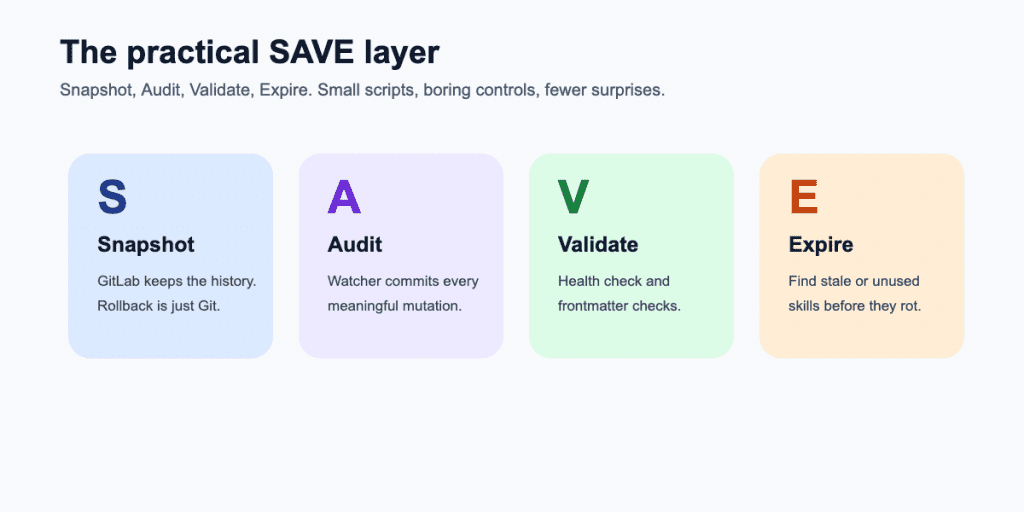
Snapshot
GitLab is the snapshot system. Every reviewed skill change can be pushed to a remote repository. That gives me backups, diffs, and a path to restore the skill library on another server.
Audit
The watcher turns meaningful file changes into commits. That gives us a timeline. It is not perfect compliance, but it is already much better than loose Markdown files with no history whatsoever.
Validate
The health check catches broken frontmatter and stale skills. The promotion script validates staged skills before they become active. This is the same principle as a CI check, just scaled down to a personal DevOps assistant.
Expire
Skills can rot. Commands change. APIs change. My own preferences change. The health script uses metadata like usage count, last-used time, and success rate to flag skills that may need review or archival.
The manual GitLab push is a feature, not a bug
It is tempting to auto-push every skill mutation. I’ve struggled with it, but I decided against it for now.
Local auto-commit gives me safety without publishing everything immediately. Manual push gives me a review gate. Before pushing, I can run:
git -C /root/.hermes/skills status --short --branch
git -C /root/.hermes/skills log --branches --not --remotes --oneline
git -C /root/.hermes/skills diff origin/main...HEAD
python /root/.hermes/custom/locastic-skill_health_check.py
git -C /root/.hermes/skills push origin main
That is a tiny workflow, but it changes the psychology. The agent can learn quickly, while I still decide what leaves the machine.
What I would improve next
This setup is intentionally small. No Kubernetes operator. No overbuilt dashboard. Just systemd, Git, GitLab, Bash, and Python.
The next improvements I would consider are:
- A CI pipeline in GitLab that runs the health check on every push.
- A pre-push hook that blocks malformed skills.
- A small report showing recently changed skills, stale skills, and pinned skills.
- A stricter split between private local skills and skills safe to publish.
- Disabling push behavior from the promotion script if we want one consistent manual-push policy.
The GitLab CI job would be especially useful. Something as small as this would already catch broken frontmatter before another machine pulls the repository:
skill-health-check:
  image: python:3.12
  script:
    - pip install pyyaml
    - python .ci/locastic-skill_health_check.py
Final thoughts
The interesting part of Hermes is not that it can answer questions. Many tools can do that, Google can do that, and Stack Overflow can do it certanly. The interesting part is that it can accumulate operational knowledge and reuse it. For a DevOps engineer, that is powerful because so much of our work is procedural: check this, compare that, restart carefully, verify logs, document the result, do not forget the weird edge case from last time.
But persistent knowledge needs discipline. If skills are allowed to grow without history, review, or cleanup, the agent gets worse in a way that is hard to see. It does not fail like a broken deployment. It fails by becoming subtly wrong.
That is why I like this setup. Hermes handles the working memory and skill execution. GitLab handles history. The watcher records meaningful changes. The health check keeps the library honest. The promotion script handles the non-standard path. And the final push remains a human decision.
It is not glamorous. It is a boring control plane for an AI agent – which is exactly why it feels like DevOps.