
ApiPlatformTranslationBundle is our Symfony bundle for translations in API Platform. Your clients get a resource in one locale per request, and the CMS behind them can read and edit all locales in one request.
We released it in 2018, and I wrote a blog post about it back then. If you learned the bundle from that post, you should know that it is out of date by now. The code there uses annotations and the old itemOperations config, and the 2.x releases changed a lot:
- The bundle runs on API Platform 3.4, 4 and 5.
PATCHupdates only the locales you send and leaves the others alone.- One config flag stops read requests from creating empty translations.
- A collection loads its translations with one join, not with one query per item.
- You can search and sort by translated fields. This came in 2.2, and 2.3 made the sorting faster.
This post replaces the old one, so it goes through the whole setup again with today’s code. If you are new to the bundle, you don’t need the old post at all. If you have used the bundle for years, have a quick look at the setup anyway, because a few details changed there too (the setters, for example).
The idea: one translation entity per resource
The approach comes from Sylius: each translatable entity gets a companion translation entity which holds all translatable fields, one row per locale. Your API then works in two modes, controlled by serialization groups:
- Single locale: the client sends
?locale=deor anAccept-Languageheader and gets translated fields as plain properties, like the entity was never translated at all. - All locales: the client asks for the
translationsgroup and gets the full collection embedded in the response, keyed by locale. This is the mode your CMS wants.
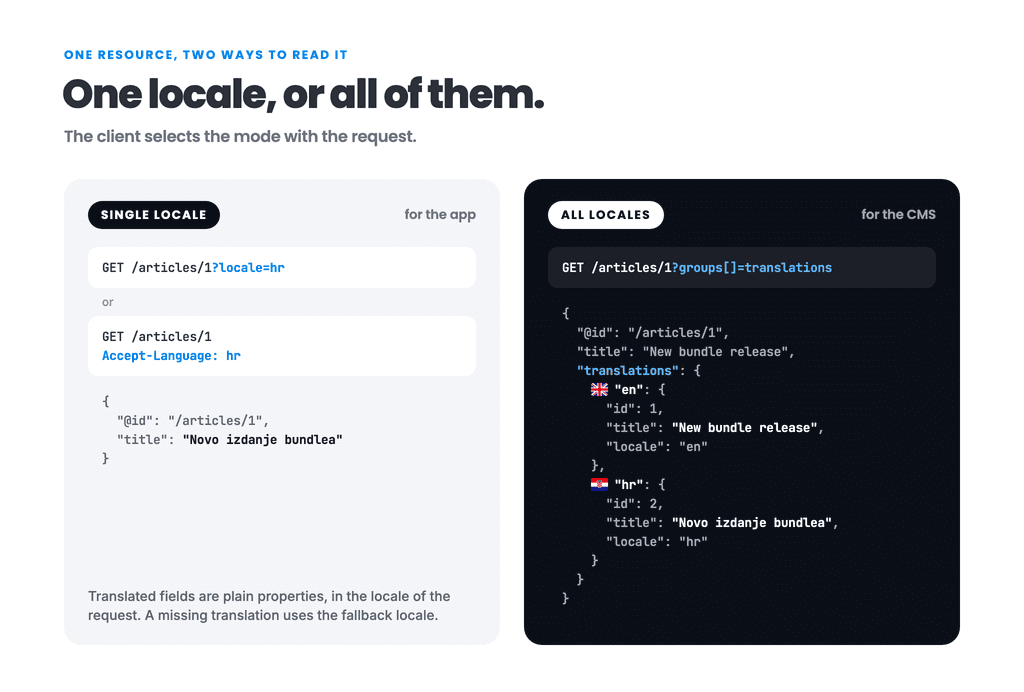
If a translation for the requested locale doesn’t exist, the fallback locale from your framework configuration is used.
Let’s get down to coding
I know most of you let agents do the coding these days, but I suggest reading this part anyway, so you can keep track of things 🙂
Install the bundle:
composer require locastic/api-platform-translation-bundleYou need PHP 8.2+, API Platform 3.4, 4.x or 5.x, and Doctrine ORM 3. Now create the entity pair. First the translatable resource:
use ApiPlatform\Metadata\ApiResource;
use ApiPlatform\Metadata\Get;
use ApiPlatform\Metadata\GetCollection;
use ApiPlatform\Metadata\Patch;
use ApiPlatform\Metadata\Post;
use Doctrine\Common\Collections\Collection;
use Doctrine\ORM\Mapping as ORM;
use Locastic\ApiPlatformTranslationBundle\Model\AbstractTranslatable;
use Locastic\ApiPlatformTranslationBundle\Model\TranslationInterface;
use Symfony\Component\Serializer\Attribute\Groups;

#[ORM\Entity]
#[ApiResource(
    operations: [
        new Get(),
        new GetCollection(),
        new Post(normalizationContext: ['groups' => ['translations']]),
        new Patch(normalizationContext: ['groups' => ['translations']]),
    ],
    normalizationContext: ['groups' => ['article_read']],
    denormalizationContext: ['groups' => ['article_write']],
    filters: ['translation.groups'],
)]
class Article extends AbstractTranslatable
{
    #[ORM\Id]
    #[ORM\GeneratedValue]
    #[ORM\Column]
    private ?int $id = null;

    #[ORM\OneToMany(
        targetEntity: ArticleTranslation::class,
        mappedBy: 'translatable',
        fetch: 'EXTRA_LAZY',
        indexBy: 'locale',
        cascade: ['persist'],
        orphanRemoval: true,
    )]
    #[Groups(['article_write', 'translations'])]
    protected Collection $translations;

    public function getId(): ?int
    {
        return $this->id;
    }

    #[Groups(['article_read'])]
    public function getTitle(): ?string
    {
        return $this->getTranslation()->getTitle();
    }

    public function setTitle(string $title): void
    {
        $this->getOrCreateTranslation()->setTitle($title);
    }

    protected function createTranslation(): TranslationInterface
    {
        return new ArticleTranslation();
    }
}
You should note three things here:
- The
translationsmapping needsindexBy: 'locale',cascade: ['persist']andorphanRemoval: true. The bundle relies on the collection being keyed by locale, so don’t skipindexBy. - Getters and setters for translated fields are virtual: the getter reads from
getTranslation()(current locale, with fallback), the setter writes throughgetOrCreateTranslation()(exact locale, created when missing). POSTandPATCHget thetranslationsnormalization group, so write operations return the full collection in the response.
The translation entity is simpler:
use Doctrine\ORM\Mapping as ORM;
use Locastic\ApiPlatformTranslationBundle\Model\AbstractTranslation;
use Locastic\ApiPlatformTranslationBundle\Model\TranslatableInterface;
use Symfony\Component\Serializer\Attribute\Groups;

#[ORM\Entity]
class ArticleTranslation extends AbstractTranslation
{
    #[ORM\Id]
    #[ORM\GeneratedValue]
    #[ORM\Column]
    #[Groups(['translations'])]
    private ?int $id = null;

    #[ORM\ManyToOne(targetEntity: Article::class, inversedBy: 'translations')]
    protected ?TranslatableInterface $translatable = null;

    #[ORM\Column]
    #[Groups(['article_read', 'article_write', 'translations'])]
    private ?string $title = null;

    #[ORM\Column]
    #[Groups(['article_write', 'translations'])]
    protected ?string $locale = null;

    public function getId(): ?int
    {
        return $this->id;
    }

    public function getTitle(): ?string
    {
        return $this->title;
    }

    public function setTitle(string $title): void
    {
        $this->title = $title;
    }
}
Every field gets the translations group, plus your usual read and write groups. That’s the whole setup.
One note on the serialization groups: we put #[ApiResource] on the Doctrine entity here because it is the shortest way to show the bundle. You can do the same with DTOs, which is the pattern the API Platform docs recommend by now. Reading needs nothing special, because your DTO takes the translated values from the same getters, and translations is just one more property to map. Writing is a bit more work: the bundle matches submitted translations to their existing rows only when the resource is the entity itself, so with a DTO your own code has to do that matching by locale (in a processor, or in an Object Mapper transformer).
Creating a resource with all locales at once
Send translations as an object keyed by locale, and repeat the locale field inside each entry:
{
    "translations": {
        "en": {
            "title": "New bundle release",
            "locale": "en"
        },
        "hr": {
            "title": "Novo izdanje bundlea",
            "locale": "hr"
        }
    }
}
Reading works the way your clients expect. GET /articles/1?locale=hr returns the Croatian title as a plain title property. GET /articles/1 with Accept-Language: hr does the same. And GET /articles/1?groups[]=translations returns the embedded collection with both locales, thanks to the translation.groups filter we registered on the resource.
Editing translations: use PATCH
Editing is the part the 2.x line reworked the most, and it now behaves the way you would expect a merge patch to behave. It updates only the locales you send and leaves the others alone:
PATCH /articles/1
Content-Type: application/merge-patch+json
{
"translations": {
"hr": {
"title": "Ispravljen naslov",
"locale": "hr"
}
}
}The Croatian row is updated in place, the English one is untouched, and you don’t need to send any ids. That’s it.
PUT also works, but it means full replace: any locale missing from the payload gets removed. If you use it, you have to disable API Platform’s standard_put (per operation with extraProperties: ['standard_put' => false], or globally), because the standard PUT builds a brand-new object and the bundle can no longer match the submitted translations to their existing rows. The bundle detects this misconfiguration and fails with an explicit error instead of corrupting your data.
Turn off translation auto-creation
One flag deserves its own section, because the default behavior has bitten real users (see issues #55 and #34 on the repo). Out of the box, calling a translated getter for a locale that has no translation would create one and attach it to the entity. Combine that with cascade: persist and a plain GET request could insert empty translation rows into your database, or crash on a not-null column. A read that writes is not something you expect to happen.
Since 2.1 you can turn it off, and in new projects you should:
# config/packages/api_platform_translation.yaml
api_platform_translation:
    auto_create_translations: false
Reads then get a detached translation object (empty fields, nothing persisted), and setters keep working because they go through getOrCreateTranslation(). The old behavior is still the default for backwards compatibility, but it is deprecated and 3.0 flips the default to false.
While you are in that file, you can also restrict which locales your API accepts and control how the locale is resolved:
api_platform_translation:
    enabled_locales: [en, hr, de]
    locale_resolution: [query_param, accept_language]
Locales outside the list fall back to your default locale instead of creating surprise rows for ?locale=klingon.
What about Gedmo Translatable or KnpDoctrineBehaviors?
Both are solid, widely used libraries. The difference is what your API needs to do.
Gedmo Translatable keeps one set of fields on the entity and swaps their values per locale through a listener. That works great when one request means one locale. But when your CMS wants to submit three locales in a single request, or wants all translations embedded in one response, you end up switching locales and flushing in a loop, or querying the translations table yourself.
KnpDoctrineBehaviors uses the same translation-entity model as this bundle, so the data side will feel familiar. What it doesn’t give you is the API layer: locale resolution from the request, serialization groups for the two response modes, and write operations that reconcile submitted translations with existing rows. That’s the part this bundle exists for.
If your app is API Platform and translations need to flow through the API in both directions, the translation-entity approach with this bundle is the least work by far. If your translations are edited server-side and your API only ever reads one locale, Gedmo will do fine and you should use whatever your team knows best.
Search and sort by translated fields
If you put a regular SearchFilter on translations.title, it searches every locale at once, so a Croatian request can match an English title. Since 2.2 the bundle has two filters that only look at the locale of the request. Add them on top of the Article resource from before:
use ApiPlatform\Metadata\ApiFilter;
use Locastic\ApiPlatformTranslationBundle\Doctrine\Orm\Filter\TranslationOrderFilter;
use Locastic\ApiPlatformTranslationBundle\Doctrine\Orm\Filter\TranslationSearchFilter;

#[ApiFilter(TranslationSearchFilter::class, properties: ['title' => 'ipartial'])]
#[ApiFilter(TranslationOrderFilter::class, properties: ['title'])]
class Article extends AbstractTranslatable
Notice that you write title, not translations.title. Now you can search and sort by the value your client actually sees:
GET /articles?locale=hr&title=izdanje
GET /articles?locale=hr&order[title]=asc
Both filters expect one translation per article and locale, which is what indexBy: 'locale' already assumes. On larger tables, tell the database about it:
#[ORM\Entity]
#[ORM\UniqueConstraint(columns: ['translatable_id', 'locale'])]
class ArticleTranslation extends AbstractTranslation
This constraint is what speeds up sorting, and you will see the numbers in the next section. For searching, the README lists which index helps which strategy (a plain index can’t serve ipartial, the one we used above). Both filters are new and marked experimental, so tell us how they work for you.
What this bundle won’t do for you
Two honest limitations before you commit:
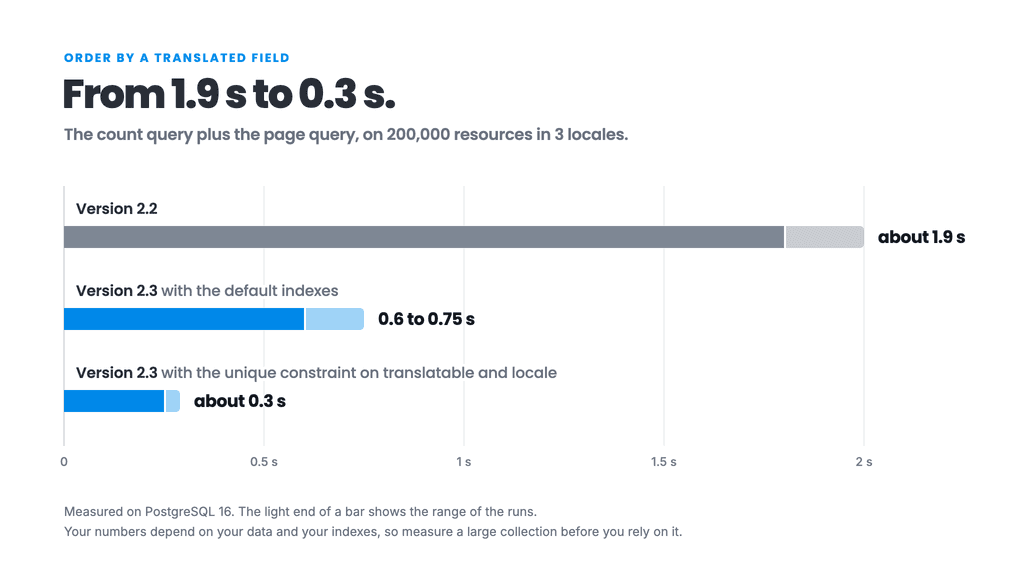
- Sorting big collections: when you order by a translated field, the database still sorts the whole filtered collection before the page is cut. When the filters came out in 2.2, we measured this on PostgreSQL with 200,000 resources in 3 locales, and the count query plus the query that picks one ordered page took about 1.9 seconds. That was too slow, so 2.3 changed how the filters join the translations. The same two queries now take about 0.3 seconds with the unique constraint from above, and 0.6 to 0.75 seconds with only the default indexes. The cost still grows with the size of the collection. It also grows with the number of locales, because by default the collection query joins all translations of every resource: with 10 locales and the unique constraint in place, the same test took 0.7 to 1.1 seconds. On a few thousand rows you probably won’t notice any of this, but on a large, unfiltered collection you should measure it first.
- Fallback values: the filters only search the locale of the request. If an article has no Croatian translation, a Croatian search will not find it by its English title.
One thing that used to be on this list is the old N+1 problem (one translation query per item on every collection). Since 2.1 the bundle loads translations with a single join, so listing 30 articles no longer means 30 extra queries.
That’s all
The full documentation, including PUT payloads with ids and every configuration option, lives in the GitHub README. Try it out, and if something is confusing or missing, open an issue and tell us. The best parts of this bundle, including the PATCH behavior, the auto-creation flag and the new filters, exist because people reported what hurt them, so keep the feedback coming! 🙂